Question Bank Organization
After the upgrade, there are now two types of question banks: Question banks in this course and This quiz question bank. Using them appropriately can help keep your questions well organized.
Question banks in this course
A reusable question repository that can be shared across courses. Multiple shared question banks can be created within a single course.
This quiz question bank
A dedicated area for a specific quiz where questions created directly within that quiz are stored. After the upgrade, such questions are saved in this quiz-specific area instead of the Course Shared Question Bank, preventing the shared bank from becoming cluttered with quiz-specific questions.
How to Identify Them on Screen
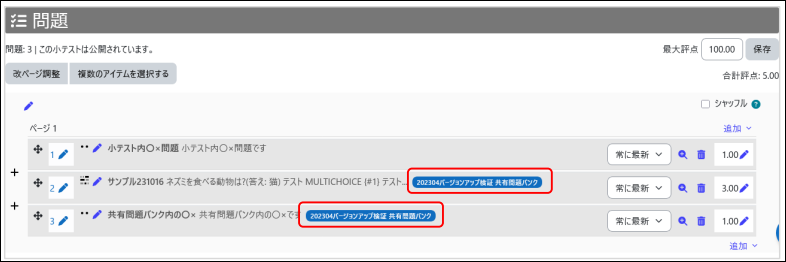
On the quiz editing page, you can tell which question bank a question belongs to by checking whether a category name is displayed next to the question.
No category displayed (first question in the screenshot): The question is stored in This quiz question bank (activity level).
Category displayed (second and third questions in the screenshot): The question is referenced from Question banks in this course, with a category name such as “… Question banks in this course”
Examples of How to Use Each Question Bank
- Create One-Time Questions Directly in the Quiz
Questions that will only be used in a particular quiz can be created directly within the quiz.
Because these questions are automatically stored in a dedicated activity-level area, Question banks in this course remains organized and uncluttered.
- Store Frequently Used Questions in Question banks in this course
Questions that serve as long-term assets, such as those used repeatedly in final exams, midterm exams, or quizzes, should be stored in Question banks in this course.
This makes it easier to reuse them in other courses or carry them over to future course offerings.
Last Updated on 2026-08-26

