Reusing Questions Across Courses
Procedure
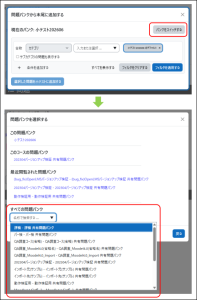
In the quiz, click “Add” and select “from question bank”.
Click “Switch bank” at the top of the screen.
From the list of “All question banks”, select the course from which you want to reuse questions.
Select the desired questions and add them to the quiz.
After the Upgrade
Exporting and importing questions between courses is no longer necessary. Simply use “Switch bank” to select another course you teach, then directly access and add questions from that course’s question bank.
Last Updated on 2026-08-26

