Question Bank Cleanup
The new question bank structure helps prevent unnecessary question data from being copied, allowing courses to be imported in a cleaner and more storage-efficient way.
Depending on the import settings, questions created specifically for a quiz are automatically copied. However, questions that are referenced from “Question Bank in this course” can now be imported as a link (reference) to the original course instead of being copied. Because unused questions in “Question Bank in this course” are not imported, course size can be kept smaller and the destination course remains clean and well organized.
Importing content into next year’s course can now be completed more quickly and smoothly. Since question banks no longer become cluttered with each import, there is no need to manually identify and remove unnecessary questions afterward.
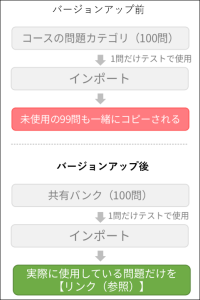
Procedure: Two Import Options Depending on Your Needs
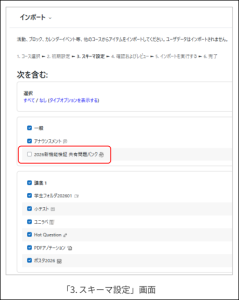
There are no question bank settings on “2. Initial settings” page of the import process. Proceed to the next step, and on “3. Schema settings” page, choose whether to enable or disable the Shared Question Bank option to determine how questions are imported.
① Keep the Course Clean and Minimize Storage Usage
In the General section, clear “Question Bank in this course” checkbox before proceeding.
⇒Only the required questions are referenced through links, preventing unused questions from being copied and avoiding unnecessary growth in course size.
- Note
- If the source course that provides the linked questions is deleted, those questions can no longer be edited.
② Import All Questions from a Previous Course
Proceed with the default setting, leaving “Question Bank in this course” checkbox selected.
⇒The entire question bank is copied into the new course as actual question data.
Last Updated on 2026-08-26

